

A BTCPay refund for a partial payment runs through a pull payment: you open the invoice, click Refund, and the customer claims the money to an address or Lightning invoice they supply. What matters is on-chain versus Lightning. An on-chain underpayment leaves the invoice open with a balance due, while a Lightning invoice settles only when the full amount arrives, so there is usually nothing partial to refund.
TL;DR:
- On-chain underpayments leave the invoice open with a remaining balance, then flag it as paid partially if it expires. Lightning invoices have a fixed amount and reject anything lower.
- A BTCPay refund is a pull payment. You set the amount, the customer supplies the destination, and you approve the payout from your own wallet.
- Overpaid and late payments get their own flags, and you decide whether to refund, mark the invoice settled, or ask for a top-up.
- Pick one refund pricing rule (same sats, invoice-time fiat value, or current fiat value) and publish it. Bitcoin price movement turns every refund into a small dispute otherwise.
- Store settings (expiry, monitoring window, payment tolerance) decide how many partial payments you ever see.
Table of Contents
- What BTCPay Does When a Customer Underpays
- Invoice States for Underpaid, Overpaid and Late Payments
- Lightning Is Different: Why You Rarely See a Partial There
- How a BTCPay Refund Works After a Partial Payment, Step by Step
- Which Rate to Refund At, and What I'd Pick
- Store Settings That Decide How Many Partial Payments You See
- When to Skip the Refund and Ask for a Top-Up
- Get Refunds and Partial Payments Handled on a Node You Don't Babysit
- Frequently Asked Questions
- Sources
What BTCPay Does When a Customer Underpays
BTCPay Server watches the payment destination it generated for each invoice and compares what arrives against the amount due. If a customer sends 0.0009 BTC against an invoice for 0.0010, the invoice does not fail. It stays open, records the payment, and the checkout page shows the remaining balance. The customer can send the difference to the same invoice until the timer runs out.
That timer is a store setting. The default invoice window is 15 minutes, and you can change it under the store's checkout settings. The plain breakdown in How Does BTCPay Server Actually Work? covers how the node, wallet and invoice fit together. Here we stay on what happens after money arrives short.
Underpayments rarely come from customers trying to shave a few sats off the price. The usual causes are:
- Exchange withdrawals. Some exchanges subtract the network fee from the amount sent, so a customer who types the exact invoice amount lands slightly under.
- Rate drift. The customer opens an old checkout tab, the invoice rate is locked, but they fund it in two transactions and miscount.
- Wallet rounding. A few wallets round amounts to fewer decimal places than the invoice shows.
Invoice States for Underpaid, Overpaid and Late Payments
BTCPay's documentation describes the core invoice statuses as New, Processing, Settled, Expired and Invalid. The partial-payment cases sit on top of those as flags, which is why an invoice can read "Expired" and still hold money for you.
| Situation | What the invoice shows | Your options |
|---|---|---|
| Underpaid, timer still running | New, with a balance due | Wait for the customer to top up |
| Underpaid, timer expired | Expired, flagged as paid partially | Refund, mark settled, or ask for a top-up |
| Overpaid | Settled, flagged as paid over | Keep it, or refund the excess |
| Paid after expiry | Expired, flagged as paid late | Mark settled or refund |
| Lightning payment below the invoice amount | No invoice change | Nothing, the payment never completes |
The same flags reach your shop through webhooks. In the Greenfield API, the expired event carries a partially-paid indicator and the settled event carries an overpaid indicator, so your integration can route these invoices to a human instead of silently shipping or silently canceling. If you have custom code, build that branch first.
Underpay on-chain and the invoice stays open with a balance due. Underpay over Lightning and the payment is rejected before you ever see it.
Lightning Is Different: Why You Rarely See a Partial There
A Lightning invoice follows the BOLT 11 payment encoding, which fixes the amount in the invoice itself. The receiving node refuses to settle an incoming payment below that amount. A customer's wallet may split the payment across several routes, but those parts only resolve together once the total reaches the invoice amount. If it does not, the parts are returned along the route.
So the partial payment problem is an on-chain problem. Overpayment can happen on Lightning in a limited way, since nodes can accept a small overage, and the refund path for that is the same pull payment described below. If you are weighing which Lightning setup to run behind your store, Best Lightning Node for BTCPay Server walks through the options.
How a BTCPay Refund Works After a Partial Payment, Step by Step
BTCPay builds refunds on its pull payment feature. A pull payment is a claim link you create with a fixed amount. The person holding the link provides a destination and requests the funds. You never ask the customer to email you an address, and you never guess one.
The merchant side
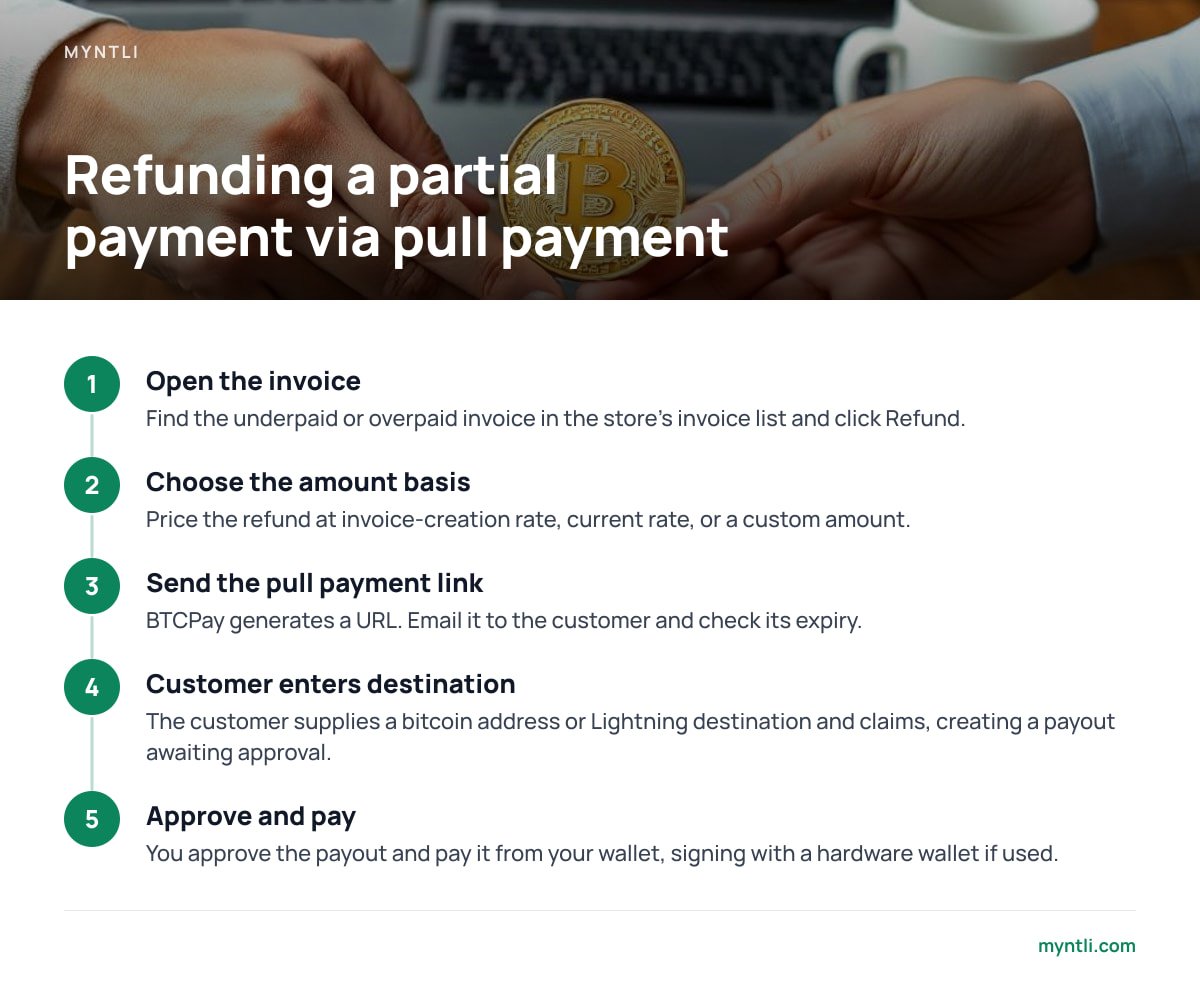
- Open the invoice. Find the underpaid or overpaid invoice in the store's invoice list and click Refund.
- Choose the amount basis. BTCPay lets you price the refund at the rate when the invoice was created, at the current rate, or at a custom amount. For an underpayment, the custom amount is the sum that actually arrived.
- Send the link. BTCPay generates a pull payment URL. Email it to the customer or paste it into your support thread. Check the link's expiry so it does not die before the customer sees it.
The customer side
- Open the link. The page shows the refund amount.
- Enter a destination. On-chain, that is a bitcoin address. If your store has Lightning enabled, the customer can supply a Lightning invoice or an LNURL-withdraw code instead.
- Claim. This creates a payout in your store's payouts queue in an awaiting-approval state.
Back to you
You approve the payout and then pay it from your wallet. With a hardware wallet, that means signing. You can batch several approved payouts into one transaction, which saves fees if you process refunds weekly. BTCPay also supports automated payout processors if volume justifies skipping the manual step.
A refund in BTCPay is a pull payment: you set the amount, the customer supplies the destination, and nothing moves until you approve and sign.
Pro Tip: Do not refund to the address that sent the payment, even if the transaction makes it look easy. On-chain, the "sender" is often an exchange's hot wallet, and coins returned there may never reach your customer. The pull payment flow avoids this because the customer picks the destination. Make it the only refund path in your support macros.
Which Rate to Refund At, and What I'd Pick
Bitcoin moves between the invoice and the refund, so you have to decide who carries that movement. BTCPay gives you the levers. The policy is yours.
| Rule | Customer gets back | Who absorbs a price rise | Who absorbs a price drop |
|---|---|---|---|
| Same sats | Exactly the bitcoin they sent | You (they receive more fiat value) | Customer (they receive less fiat value) |
| Invoice-time fiat value | The original fiat amount, converted at the invoice rate | Nobody, it matches the sats sent | Nobody, it matches the sats sent |
| Current fiat value | The original fiat amount, converted today | You, paying fewer sats than you took | You, paying more sats than you took |
My pick is two rules, written down. For an underpaid or failed order, where the sale never completed, refund the sats that arrived. It is the easiest to explain and audit: what came in goes out. For a returned item after delivery, refund the original fiat price converted at the current rate. You are returning the sale, and the customer expects the price on the receipt.
If you price in fiat and want the least arguing, invoice-time fiat value is the neutral option. It takes a little more thought per refund but leaves nobody a windfall. Whatever you choose, put it on your returns page before the first dispute.
Network fees are separate. They come out of your wallet when you send the refund. If your policy lets the customer bear the fee, reduce the refund amount manually and say so in the policy.
Store Settings That Decide How Many Partial Payments You See
Most partial-payment cleanup is avoidable with four settings:
- Invoice expiry. The 15-minute default suits a customer sitting at checkout. If your buyers fund from an exchange, which can take longer to authorize a withdrawal, a longer window cuts expired-with-balance invoices.
- Monitoring window. BTCPay keeps watching an expired invoice's destination for a period afterward, which is how late payments get flagged. Check what yours is set to, and do not make it so short that a payment sent at minute 14 lands unmonitored.
- Payment tolerance. This setting lets BTCPay treat an invoice as paid when the shortfall is within a percentage you set. The default is zero. A small tolerance absorbs the cents lost to exchange fee deduction without any refund work. Pick a number you would happily write off on every order.
- Confirmation requirement. This decides when a payment counts as settled. A stricter policy delays the point at which you learn whether an invoice was fully paid, so it affects how long a customer waits before you can send a top-up request.
All of this assumes your node stays synced and your webhooks keep firing. A node that falls behind can show an invoice as underpaid when the payment is simply unseen. Monitor BTCPay Server Uptime and Sync covers the alert thresholds worth setting.
When to Skip the Refund and Ask for a Top-Up
A refund costs a network fee on your side, a second fee if you resell, and a support thread. If a customer underpaid by a few dollars and the goods have not shipped, a top-up request is usually cheaper for both of you.
Use these rules of thumb:
- Shortfall under your tolerance. Mark the invoice settled and ship. The tolerance setting does this automatically for future orders.
- Shortfall larger, goods not shipped. Ask for the difference. Create a new invoice for the remainder, since a clean invoice is easier to reconcile than a stretched old one.
- Customer wants out. Refund what arrived through a pull payment and cancel the order.
- Payment arrived late and the price has moved. Refund, then offer a fresh invoice. Settling at a stale rate shifts the market risk onto you.
BTCPay Server Pros and Cons lays out the trade-off if you are deciding how much of this to handle yourself. Refund handling is one of the places where self-custody means you do the work.
Get Refunds and Partial Payments Handled on a Node You Don't Babysit
Everything above depends on a synced node, a working wallet connection and webhooks that reach your shop. Myntli runs that stack for $29 a month: we install BTCPay Server, monitor sync, apply updates and wire it into WooCommerce, Shopify, Ghost, Magento, PrestaShop, Drupal Commerce, Invoice Ninja or ReplaPay. Payments land in your own wallet, we take no percentage, and we never hold your funds. If you would rather run it on hardware you own, the full node install is $449.
One limit: because the money sits in your wallet and not ours, Myntli cannot approve or send a refund for you. You still approve each payout and sign it, and every on-chain refund still costs a network fee. We handle the infrastructure underneath, so an underpaid invoice shows up correctly and your refund link works when you create it. Check the settings described above against your own store before launch, ours included.
Frequently Asked Questions
Can BTCPay Server refund a partial payment automatically?
Not by default. BTCPay flags the invoice as paid partially and leaves the decision to you. You can create a pull payment refund manually, and payout processors can automate the sending step once a customer has claimed and you have approved.
What happens if a customer pays less than the invoice amount over Lightning?
The payment does not complete. A Lightning invoice has a fixed amount, and the receiving node rejects payments below it, so the money returns to the customer's wallet and your invoice stays unpaid.
Does the customer need a BTCPay account to receive a refund?
No. The refund is a pull payment link. The customer opens it, enters a bitcoin address or Lightning destination from any wallet they use, and claims the amount.
Who pays the network fee on a BTCPay refund?
By default the fee comes out of your wallet when you send the payout. If your policy puts the fee on the customer, reduce the refund amount manually and state that in your returns terms.
Can I mark an underpaid invoice as settled instead of refunding?
Yes. You can manually mark an invoice settled from the invoice page, which suits small shortfalls. Setting a payment tolerance percentage in store settings handles the same case automatically for future invoices.
Sources
- BTCPay Server Documentation | BTCPay Server Project
- Pull Payments | BTCPay Server Documentation
- BOLT 11: Invoice Protocol for Lightning Payments | Lightning Network Specifications
- BTCPay Server source repository | BTCPay Server Project on GitHub