

A Shopify integration for self-custodial bitcoin payments works differently from a card gateway. Shopify does not let independent processors like BTCPay Server into its native payment step. The customer places the order first, then pays a bitcoin invoice on the thank-you page, and Shopify marks the order paid once the invoice settles. That one design fact shapes everything else: setup, order handling, refunds, and which hosting option makes sense for you.
TL;DR:
- Self-hosted bitcoin processors connect to Shopify as a manual payment method, so the customer pays after placing the order, not inside the checkout.
- Shopify deprecated the old "additional scripts" approach, so current BTCPay Server setups use a Shopify app and BTCPay's Shopify plugin instead.
- You can self-host BTCPay Server, use a managed hosted store, or have a full node installed on your own server. The trade-off is control against maintenance.
- Unpaid bitcoin orders sit as "pending" in Shopify, and refunds have to be sent from BTCPay, because Shopify cannot move bitcoin.
- For most small merchants, a managed instance paying into your own wallet is the sensible default. Run your own node once volume or privacy needs justify the upkeep.
Table of Contents
- How a Shopify Integration for Bitcoin Actually Works, and Why It Sits Outside Checkout
- What Changed: Checkout Extensibility Retired the Old Script Method
- Three Ways to Run the BTCPay Server Behind Your Shopify Store
- Setting Up the Integration, Step by Step
- Pending Orders, Confirmations and Refunds: Where Merchants Get Caught
- Which Setup We Would Pick, and When to Change It
- Get Bitcoin Payments Working on Shopify Without Running a Server
- Frequently Asked Questions
- Sources
How a Shopify Integration for Bitcoin Actually Works, and Why It Sits Outside Checkout
Shopify keeps tight control over its checkout. Card processors and wallets that appear inside the payment step are approved partners that Shopify has vetted and integrated. A self-hosted, open-source processor such as BTCPay Server is not one of them. It is not supposed to be: there is no company behind your instance to sign a partner agreement, only software you or your host runs.
The workaround is Shopify's own manual payment methods feature. This is the same mechanism stores use for bank transfers or cash on delivery. You add a manual method named something like "Bitcoin," and the customer selects it at checkout. Shopify creates the order with payment pending. On the thank-you page, the BTCPay integration shows a button that opens a bitcoin invoice for the exact order total. When that invoice settles, BTCPay tells Shopify, and the order flips to paid.
Shopify does not let a self-hosted bitcoin processor into its native payment step. The order is created first; the bitcoin arrives second.
This sequence matters more than any setting you will touch. It means you will see orders that were placed but never paid. Your fulfillment team needs to know that "pending" on a bitcoin order means "do not ship yet." It also means the customer's experience depends on that thank-you page doing its job clearly.
What Changed: Checkout Extensibility Retired the Old Script Method
For years, the standard BTCPay–Shopify setup pasted a JavaScript snippet into the "Additional scripts" box on the order status page. That approach is going away. Shopify has deprecated checkout.liquid and additional scripts on the Thank you and Order status pages in favor of Checkout Extensibility, its app-based system for customizing checkout.
BTCPay Server responded by rebuilding the integration. In BTCPay Server 2.0, Shopify support moved into a plugin. The current method, described in the BTCPay Server Shopify documentation, has you create a custom app through a Shopify Partner account. You then connect that app to your BTCPay store through the plugin, which deploys the checkout extension that shows the payment button.
If you are following a tutorial that tells you to paste a script into your settings, it is out of date. Close it. Setups built on the old method need to be migrated before Shopify switches off scripts for your plan. Check Shopify's deprecation notices in your admin for the date that applies to you.
Pro Tip: Create the Shopify Partner account under a business email you will still control in three years, not a contractor's or employee's personal address. The custom app lives under that Partner account. If whoever set it up leaves and takes the login with them, you will end up rebuilding the integration rather than editing it.
Three Ways to Run the BTCPay Server Behind Your Shopify Store

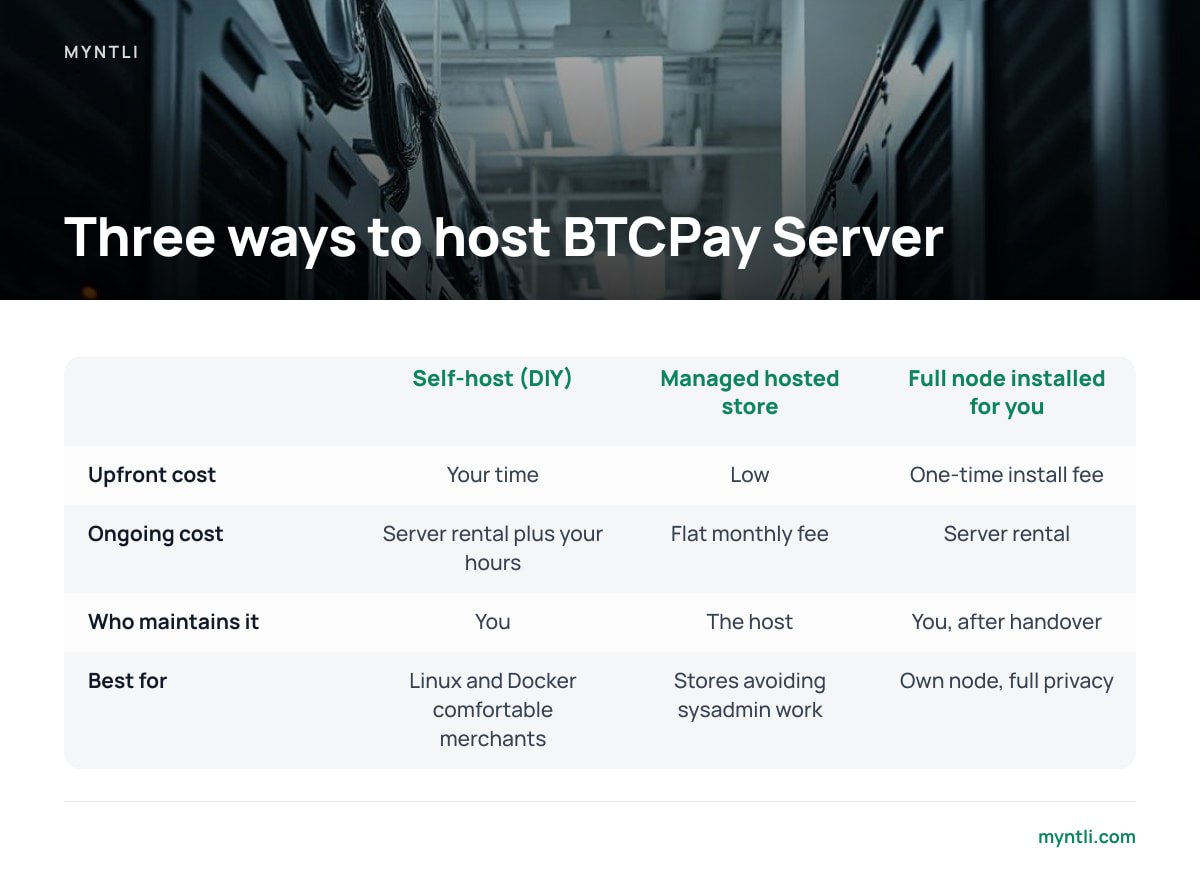
The Shopify side is the same whichever option you pick. The real decision is where BTCPay Server runs and who keeps it alive. In all three options, customer payments land in your own wallet. None of them puts a third party in custody of your funds, which is the core difference covered in custodial vs non-custodial crypto payment processors.
| Option | Upfront cost | Ongoing cost | Who maintains it | Best for |
|---|---|---|---|---|
| Self-host on your own server (DIY) | Your time | Server rental plus your hours | You | Merchants comfortable with Linux, Docker and node sync issues |
| Managed hosted store on a provider's node | Low | Flat monthly fee | The host | Small and mid-sized stores that want bitcoin without sysadmin work |
| Full node installed on your server by a provider | One-time install fee | Server rental | You, after handover | Stores that want their own node and full privacy, but not the install headache |
Self-hosting it yourself
BTCPay Server is free and open source. You can run it with no software bill at all. The cost is the server and your attention. An unpruned bitcoin node needs well over 600 GB of disk and keeps growing. You also have to apply BTCPay updates, watch for sync stalls, and fix things when an invoice does not register at 11 p.m. on launch day. If you enjoy that, it is the purest option. If you do not, it becomes the reason your bitcoin checkout quietly breaks.
A managed hosted store
Here your store runs on a node the host operates. The host handles updates, monitoring and sync, and you connect your own wallet so funds go straight to you. The trade-off is that you rely on the host to keep the node up, and the host's node sees your store's invoice data. For most shops doing modest bitcoin volume, that is an acceptable price for never having to SSH into anything.
A full node on your own server, installed for you
This is the middle path. You own the server and the node, so your invoice data stays on your hardware. Someone else does the initial install and the Shopify wiring. After handover, the upkeep is yours unless you arrange otherwise.
Setting Up the Integration, Step by Step

The exact screens change with each BTCPay and Shopify release, so treat the official documentation as the authority. The overall flow looks like this.
1. Get a working BTCPay store with a wallet attached
Create a store in BTCPay Server and connect a wallet you control. You typically do this by importing an extended public key (xpub) from a hardware or software wallet, so BTCPay can generate fresh addresses without ever holding your keys. If you also want Lightning payments, set that up now. Lightning makes small purchases settle in seconds rather than waiting for a block.
2. Enable the Shopify plugin and create the Shopify app
Install the Shopify plugin in BTCPay Server. Then create a custom app in your Shopify Partner dashboard, following the BTCPay documentation, and link the app credentials to your BTCPay store. The plugin handles deploying the checkout extension.
3. Add the manual payment method in Shopify
In Shopify's payment settings, add a manual payment method. Its name must match what the BTCPay documentation specifies, because the integration uses it to recognize bitcoin orders. Write the customer-facing instructions so they say plainly that payment happens on the next screen.
4. Place a real test order
Buy something cheap from your own store and pay it, ideally over Lightning so you are not waiting on confirmations. Confirm the order changes from pending to paid in Shopify. Confirm the funds show up in your wallet. Do not announce bitcoin payments until this round trip has worked once.
Pending Orders, Confirmations and Refunds: Where Merchants Get Caught

The integration is simple once it is running. The operational edges are where problems show up.
- Abandoned bitcoin orders. Some customers choose bitcoin, see the invoice, and leave. Shopify keeps those orders as pending payment, and depending on your settings they may hold inventory. Build a routine to review and cancel stale bitcoin orders, so stock does not look sold when it is not.
- Invoice expiry. BTCPay invoices lock in an exchange rate for a limited window. If a customer pays after expiry, the invoice will not settle cleanly, and you will have to reconcile the payment by hand. Keep the window reasonable, and make sure the thank-you page tells customers to pay promptly.
- Confirmation speed. On-chain bitcoin produces a block roughly every ten minutes on average, a property described in the original Bitcoin whitepaper. BTCPay lets you choose how many confirmations count as paid. Waiting for more confirmations protects you better against double-spends but slows fulfillment. For low-value digital goods, Lightning sidesteps the question entirely.
- Refunds. Marking a refund in Shopify does not move any bitcoin, because Shopify has no access to your wallet. You issue the refund from BTCPay, which can create a refund for the customer to claim. You then record it in Shopify separately. Decide in advance whether you refund the original fiat value or the original sats, and state that in your policy. Bitcoin's price can move between purchase and refund.
A refund marked in Shopify sends zero satoshis. The money only moves when you refund from BTCPay Server.
Which Setup We Would Pick, and When to Change It
For a store that is adding bitcoin as one option alongside cards, start with a managed hosted store. The Shopify integration needs a reliable, current BTCPay instance behind it. Checkout Extensibility already made the old setups obsolete once, and keeping up with the next change is exactly the kind of chore that gets neglected. Paying a flat fee to someone whose job is keeping the node synced is cheaper than one weekend lost to a stalled node.
Move to your own node when one of three things is true. Your bitcoin volume is high enough that you want full control. Your privacy requirements rule out sharing a node. Or you have someone in-house who actually likes running servers. Self-host from scratch only if you are that person. The broader trade-offs are laid out in how a non-custodial crypto payment gateway works and what it costs. If you are still weighing whether bitcoin belongs in your store at all, start with accepting bitcoin in your online store without a middleman.
One thing we would not compromise on in any setup: the funds go to a wallet whose keys you hold. A Shopify integration that routes payments through someone else's custody is a different product with different risks, whatever the checkout button looks like.
Get Bitcoin Payments Working on Shopify Without Running a Server
Myntli handles the part of this article that breaks most often: the BTCPay Server behind the button. For $29 a month, you get a hosted BTCPay store on our node, with updates, monitoring and sync maintenance handled for you. We also wire it into Shopify using the current app-based integration, not the retired script method. Customers pay straight into your own wallet. We take no percentage, hold no funds, and require no KYC on your store. If you do not have a self-custody wallet yet, we will walk you through setting one up.
If you would rather keep the node on your own hardware, we will install a full BTCPay Server node on your server for $449, Shopify wiring included. The honest limit is that no host can put bitcoin inside Shopify's native payment step. Customers still pay on the thank-you page, so test the flow with your own audience before you rely on it.
Frequently Asked Questions
Can bitcoin appear as a payment option inside Shopify's native checkout with BTCPay Server?
Not in the native payment step. Shopify reserves that step for approved payment partners. BTCPay Server connects as a manual payment method instead, and the customer pays a bitcoin invoice on the thank-you page after placing the order.
Does the old BTCPay Shopify script method still work?
You should not build on it. Shopify has deprecated additional scripts on the Thank you and Order status pages in favor of Checkout Extensibility. BTCPay Server's current integration uses a Shopify app and its Shopify plugin instead.
Who holds the money when I use BTCPay Server with Shopify?
You do, as long as you connect a wallet whose keys you control. BTCPay Server generates addresses from your wallet's public key, so payments go straight to you. That holds whether you self-host the server or use a managed host.
How do refunds work for bitcoin orders on Shopify?
Shopify cannot send bitcoin, so marking a refund there moves no funds. You issue the refund from BTCPay Server and record it in Shopify separately. Decide in advance whether you refund the original fiat value or the original amount of bitcoin.
Do I need Lightning for a Shopify bitcoin integration?
No. On-chain payments work, but they depend on block confirmations that arrive roughly every ten minutes on average. Lightning settles in seconds, which suits smaller purchases and makes test orders far quicker.
Sources
- BTCPay Server Shopify Integration | BTCPay Server Docs
- BTCPay Server Documentation | BTCPay Server
- Manual payment methods | Shopify Help Center
- Checkout Extensibility | Shopify Help Center
- Bitcoin: A Peer-to-Peer Electronic Cash System | bitcoin.org