

A BTCPay server installation service sets up a self-hosted bitcoin payment processor and connects it to your shop, so customers pay straight into your own wallet. The key choice is where the node runs. A hosted store on someone else's node gets you live quickly and cheaply. A full node installed on your own server costs more and needs ongoing upkeep, but it verifies every payment yourself and leaves you dependent on no one.
TL;DR:
- A BTCPay installation service should cover the server, the node sync, TLS, wallet connection and your shop plugin. Installing the software alone leaves the job unfinished.
- A hosted store on a provider's node is the right starting point for most merchants. Choose your own full node when independent verification or multiple stores justify the cost.
- An unpruned bitcoin node needs well over 600 GB of fast disk and can take days to sync. Budget the hardware before you budget the installation.
- No legitimate installer needs your seed phrase. BTCPay can work from a watch-only extended public key that cannot spend funds.
- Most of the work comes after installation day: updates, sync monitoring and plugin compatibility. Price that in when you compare quotes.
Table of Contents
- What a BTCPay Server Installation Service Actually Includes, and What It Shouldn't
- Hosted Store or Your Own Node: The Decision That Sets Everything Else
- What the Hardware Has to Handle: Disk, Sync, and Uptime
- Why the Installer Should Never See Your Seed Phrase
- The Work That Starts After Installation Day
- How to Judge Any Installation Quote Before You Pay
- Get BTCPay Live in Your Shop Without Opening a Terminal
- Frequently Asked Questions
- Sources
What a BTCPay Server Installation Service Actually Includes, and What It Shouldn't
BTCPay Server is free, open-source software, so you are not paying for a license. You are paying someone to do the work around it. A complete installation service covers five jobs. If a quote skips any of them, you will end up doing that job yourself.
The server and the node
Provisioning. Someone has to choose the hardware or virtual server, install the operating system, harden SSH and set up the firewall. The BTCPay Server documentation describes a Docker-based deployment as the standard route, and a competent installer will follow it rather than improvise.
Node sync. BTCPay depends on a bitcoin node, normally Bitcoin Core, to see payments arrive on the blockchain. A fresh node has to download and verify the full chain history before it is useful. The installation is not finished until that sync is complete.
The connections
TLS and domain. Your checkout page needs a valid HTTPS certificate on your domain or subdomain. The standard BTCPay deployment uses Let's Encrypt for free, automatically renewing certificates. Automatic renewal still fails if DNS or firewall rules are wrong, so someone has to confirm it works.
Wallet connection. BTCPay generates a fresh address for every invoice from your wallet's extended public key. Getting that key from your wallet into BTCPay correctly, including the right derivation path, is where many DIY setups go wrong.
Shop integration. The plugin for WooCommerce, Shopify, Magento or whichever platform you use has to be installed, given API keys and tested with real orders. Until a test order changes from "pending" to "paid" by itself, the integration is unproven.
What a service shouldn't include is custody of your money, a percentage of your sales, or identity checks on your own store. If you want a broader explanation of why that matters, see our guide to a non-custodial crypto payment gateway.
Hosted Store or Your Own Node: The Decision That Sets Everything Else

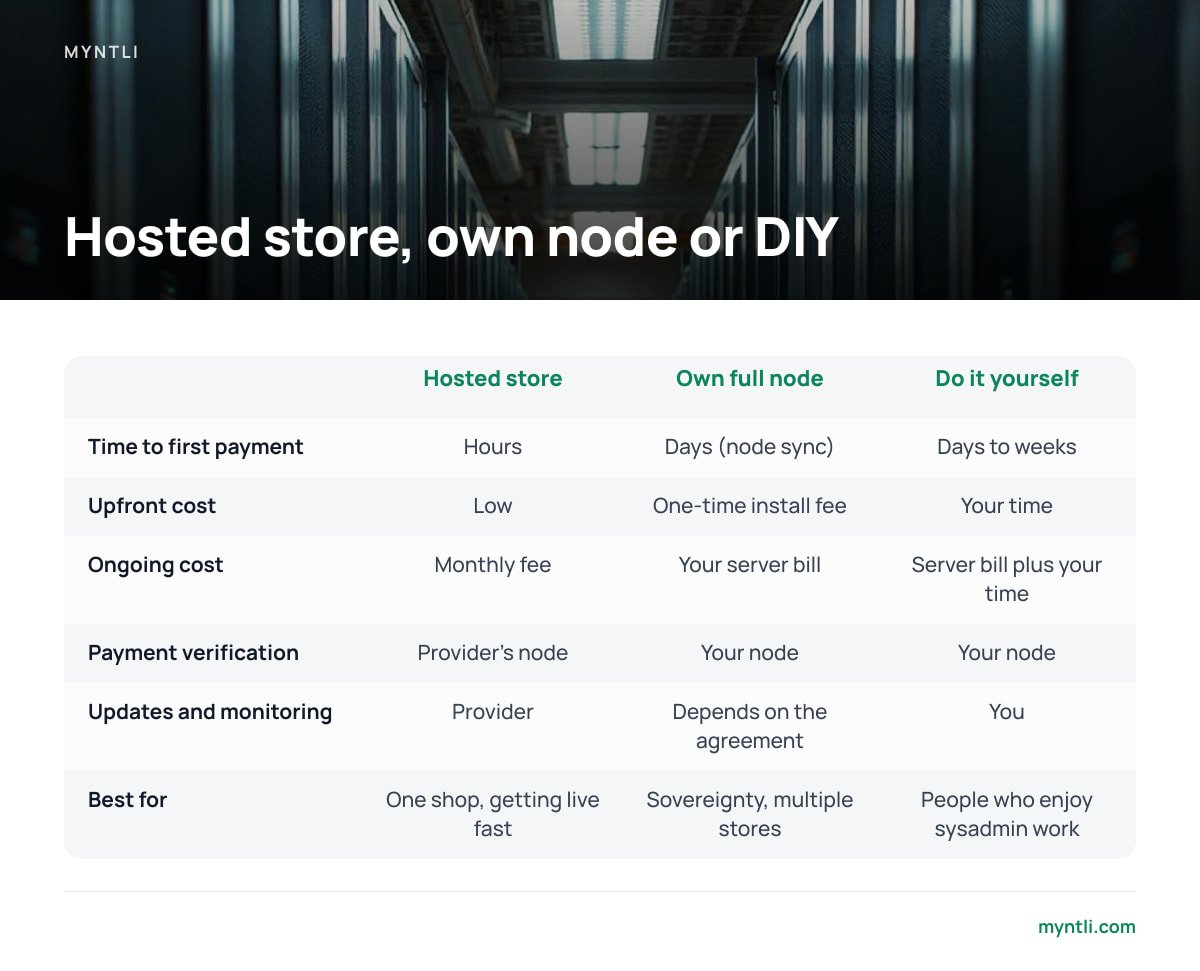
Every other choice follows from this one. On a hosted store, your BTCPay store runs on a node the provider operates and maintains. On your own node, the full stack runs on a server you control, and that node verifies every payment.
Both models are non-custodial. In both, customer payments go to addresses derived from your wallet, and the provider never holds your funds. The difference is who you trust to report that a payment confirmed, and who carries the operational burden.
| Hosted store on a provider's node | Full node on your own server | Do it yourself | |
|---|---|---|---|
| Time to first payment | Hours | Days (node sync) | Days to weeks |
| Upfront cost | Low | One-time install fee | Your time |
| Ongoing cost | Monthly fee | Your server bill | Your server bill plus your time |
| Payment verification | Provider's node | Your node | Your node |
| Custody of funds | You | You | You |
| Updates and monitoring | Provider | Depends on the agreement | You |
| Best for | One shop, getting live fast | Sovereignty, multiple stores, existing infrastructure | People who enjoy sysadmin work |
Our recommendation: most small merchants should start with a hosted store. You will learn whether your customers actually pay in bitcoin before you commit to a server bill and a terabyte of disk. Move to your own node once bitcoin is a real share of revenue, once you run several stores, or once trusting another party's node for payment confirmation bothers you on principle. All three are good reasons.
Don't expect your own node to save you money. A one-time install fee looks cheaper than a monthly fee after a year or so. That comparison leaves out the server itself, which needs enough disk for the full blockchain and has to stay online. The reason to run your own node is independence. It is rarely cheaper.
What the Hardware Has to Handle: Disk, Sync, and Uptime

If you choose your own node, the hardware decides whether the next three years go smoothly or turn into a series of disk-full alerts.
Disk. An unpruned bitcoin node stores every block since 2009, and the chain keeps growing.
The full bitcoin blockchain is already well over 600 GB. Buy 1 TB of SSD for a new unpruned node, or you will be migrating disks within a couple of years.
Pruning as an option. BTCPay's deployment supports pruned nodes, which discard old block data after verifying it. That reduces disk needs dramatically. The trade-off is that you cannot rescan deep history. For a merchant wallet created recently, that rarely matters, but you need to decide before the first sync, not after.
Sync time. According to Bitcoin.org's guidance on running a full node, the initial download is a heavy, multi-day process for most hardware. Slow disks are the usual bottleneck. Spinning hard drives can stretch the sync from days into weeks, which is why SSD is not optional here.
Uptime. If the node is offline, invoices cannot be marked paid. The customer's bitcoin still arrives in your wallet, but your shop won't know the order was paid. Your server needs to stay up, and someone needs to be alerted when it goes down.
Memory and CPU. For a single merchant, 2 vCPUs and 4 GB of RAM is a sensible floor for a full node with BTCPay. Below that, sync slows down and the checkout page can lag under load.
Why the Installer Should Never See Your Seed Phrase

This is the most important security point in the article, and it is simple. BTCPay does not need your private keys to accept payments.
When you connect a wallet by its extended public key (xpub, ypub or zpub, depending on address type), BTCPay can generate a new receiving address for every invoice and watch the blockchain for payments to those addresses. That key cannot move funds.
A BTCPay store connected by extended public key can detect every payment you receive and cannot spend a single satoshi of it.
That design is what makes a third-party installation service safe to use. Someone can install, configure and maintain your entire payment stack without being able to touch your money. If a server is compromised, the attacker sees your sales history but cannot drain your wallet.
Pro Tip: Before you approve the installation, generate two receiving addresses in your own wallet app. Then create two test invoices in BTCPay and compare the addresses. They should match exactly and in the same order. A mismatch usually means a wrong derivation path or address type, and that sends customer payments to addresses your wallet never scans. It is far better to catch that before launch than after your first real order.
If an installer asks for your 12 or 24 words "to set up the wallet," stop the engagement. No legitimate BTCPay setup for receiving payments requires them. If you don't have a self-custody wallet yet, get help setting one up on your own device, with the seed written down by you and seen by nobody else.
The Work That Starts After Installation Day
Installation is a one-time job. Keeping the setup running is permanent, and it is where DIY setups usually stop working without anyone noticing.
BTCPay releases. The project ships updates regularly, including security fixes. Skipping them for a year and then upgrading in one jump is how setups break.
Bitcoin Core updates. Node software needs updating too, and major versions sometimes change defaults that matter to a payment server.
Plugin compatibility. Your shop platform updates on its own schedule. A WooCommerce or Magento update can break the payment plugin, and the first sign is usually a customer saying their order still shows unpaid.
Sync drift. Nodes can stall after a crash, a disk filling up or a network problem. A node that has fallen 50 blocks behind will keep displaying invoices but won't confirm any of them.
Certificate renewal. Automatic renewal works until a DNS change quietly breaks it. Then your checkout shows a browser security warning to every customer.
When you compare quotes, ask what happens in month seven, not just on day one. An installation without monitoring is only finished until the first update.
How to Judge Any Installation Quote Before You Pay
Use this checklist. A good provider will answer each point in one sentence.
Who runs the node? Ask whether it is a dedicated node, a shared node, or your own hardware. Each is valid. Being vague about it is not.
Is it pruned or unpruned? You should know which one you are getting and why.
What does the wallet connection use? The answer should be an extended public key and nothing more.
Which shop integration is included? Get it named, installed and tested with a real order before handover.
Who updates what, and how often? Updates for BTCPay, the node and the plugin should be spelled out.
What triggers an alert? At minimum, node downtime, sync falling behind and certificate expiry.
Can you leave? You should be able to export your store and move to your own server without losing your wallet, because your wallet was never theirs.
Is there a fee on sales? For a self-hosted BTCPay setup, the answer should be no. If you are still weighing BTCPay against a traditional processor, our comparison of custodial vs non-custodial crypto payment processors explains what a percentage fee usually pays for.
For the merchant-side steps that come before any of this, such as pricing, checkout copy and refunds, read how to accept bitcoin in your online store without a middleman.
Get BTCPay Live in Your Shop Without Opening a Terminal
Myntli handles everything in this article for you. A hosted BTCPay store on our node costs $29 a month and includes the shop integration (WooCommerce, Shopify, Ghost, Magento, PrestaShop, Drupal Commerce, Invoice Ninja or ReplaPay), the wallet connection by public key only, and ongoing monitoring, updates and sync maintenance. If you don't have a self-custody wallet yet, we guide you through setting one up on your own device. API access is available if you build custom checkouts.
If you want your own node, we install a full BTCPay Server node on your server for $449 one-time. One honest caveat: that price covers the installation, not the hardware. You still pay for the server, it still needs adequate SSD, and the first sync still takes days whoever runs it. Check the disk and memory specs on any server, including one you rent for us to install on, before you commit.
Frequently Asked Questions
How long does a BTCPay server installation take?
A hosted store on an existing node can usually be taking payments within hours, because the node is already synced. A new full node on your own server takes days, mostly because of the initial blockchain sync. The shop integration and test orders add a few hours either way.
Does a BTCPay installation service hold my bitcoin?
No. A properly configured BTCPay store sends every payment to addresses derived from your own wallet's extended public key. The service can see that payments arrived but cannot spend them, which is why you should never share your seed phrase with an installer.
Should I choose a hosted BTCPay store or my own full node?
Start with a hosted store if you have one shop and want to find out whether customers will pay in bitcoin. Choose your own node if you want independent verification of every payment, run several stores, or already operate servers. Running your own node is about independence, not lower cost.
How much disk space does a BTCPay full node need?
An unpruned bitcoin node needs well over 600 GB today, so 1 TB of SSD is a sensible minimum for a new setup. A pruned node needs far less space but cannot rescan old blockchain history. Decide which one you want before the first sync starts.
Does BTCPay Server charge transaction fees?
BTCPay Server is free, open-source software and takes no percentage of your sales. You pay for hosting or installation, plus normal bitcoin network fees when funds move on-chain. A provider who adds a percentage on top of a BTCPay setup is charging for something the software does not require.
Sources
- BTCPay Server Documentation | BTCPay Server
- BTCPay Server source code repository | GitHub
- Bitcoin Core | Bitcoin Core project
- Running a Full Node | Bitcoin.org
- Let's Encrypt | Internet Security Research Group