

A Magento 2 plugin can mean two different things. To a developer, it is an interceptor: a small class that runs code before, after, or around a public method. To a merchant, it is an installable extension that adds a feature. You buy extensions. Plugins are one technique an extension uses inside its code. The extension worth buying is the one that uses that technique carefully, especially at checkout, where one badly written plugin can break every order.
TL;DR:
- In Magento's own documentation, "plugin" means an interceptor class. Merchants use the word for extensions, which are packaged modules you install.
- Interceptors cannot touch final, static, or non-public methods, constructors, or virtual types. Some customizations need observers or preferences instead.
- Preferences are the riskiest pattern. When two extensions declare a preference for the same class, only one wins, and the other stops working without warning.
- Before you buy, check the extension's composer.json version constraints, its install method, its update history, and how many around plugins it adds to checkout.
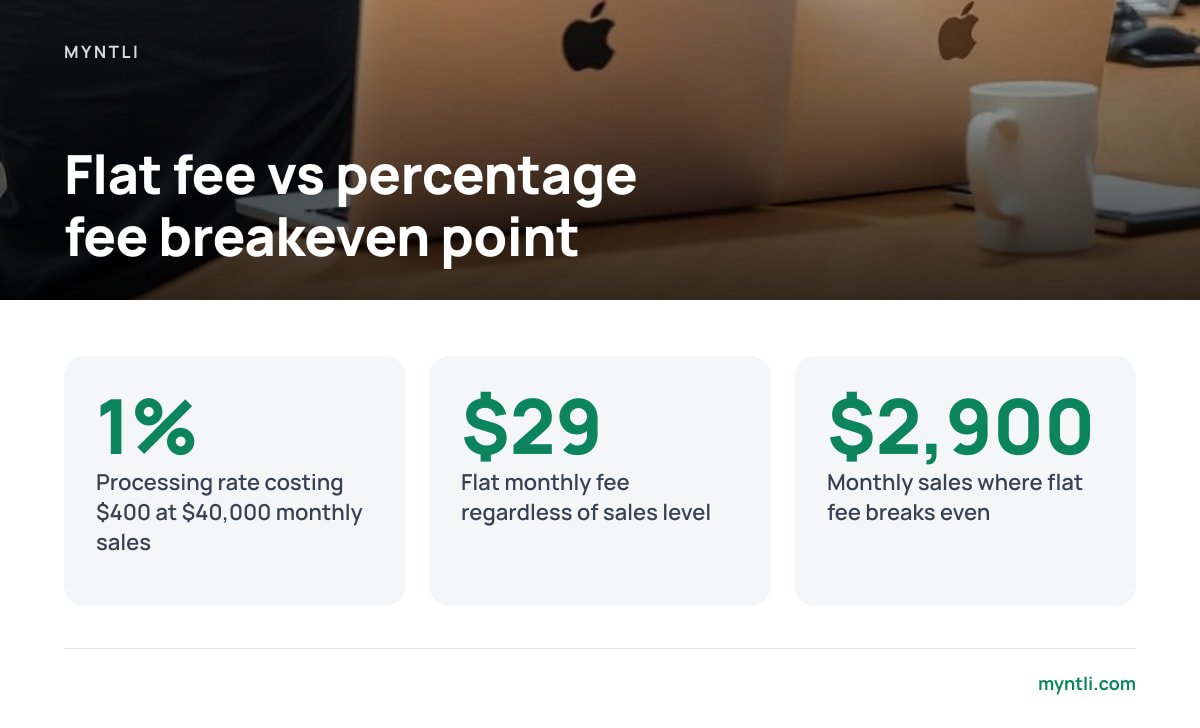
- For payment extensions, the plugin's price matters less than the processor's cut. At 1%, a flat $29 monthly fee wins once you pass about $2,900 in monthly sales.
Table of Contents
- "Magento 2 Plugin" Means Two Things, and Only One Is for Sale
- How an Interceptor Works, and the Eight Places It Cannot Reach
- Plugins vs Observers vs Preferences: Which One a Good Extension Uses
- Before You Buy a Magento 2 Plugin: Seven Checks That Predict Trouble
- Installing a Magento 2 Extension Without Breaking Production
- Payment Extensions Are a Different Risk Class
- Free Themes, Partner Lists, and Other Shortcuts Worth Checking
- Add Self-Custody Bitcoin Checkout to Magento 2 Without Running a Node
- Frequently Asked Questions
- Sources
"Magento 2 Plugin" Means Two Things, and Only One Is for Sale
When you search for a Magento 2 plugin, about half the results are coding tutorials and the other half are stores. That split is real, and it causes expensive mistakes.
In Adobe's Commerce developer documentation, a plugin is an interceptor. It is a PHP class, declared in a module's di.xml file, that changes how a public method on another class behaves. It never edits the original file. Magento generates interceptor classes during compilation, and they wrap the original method so your code runs at the right moment.
To merchants, agencies, and most marketplaces, "plugin" means an extension. An extension is a complete module, or a bundle of modules, that adds a feature such as a payment method, a shipping rate calculator, or a product feed. A single extension may contain a dozen interceptor plugins, several observers, a few database tables, and an admin settings page.
| Term | What it is | Who writes it | What you do with it |
|---|---|---|---|
| Plugin (interceptor) | A class that runs code before, after, or around a public method | Developers | You inspect it, or you pay someone to write one |
| Observer | A class that reacts to a dispatched event | Developers | You inspect it |
| Preference | A full replacement of one class with another | Developers | You avoid stacking them |
| Extension (module) | A packaged feature, installed via Composer | Vendors and agencies | You buy, install, and maintain it |
If you are a merchant, you are shopping for extensions. The interceptor detail still matters, because how an extension uses interceptors decides whether it survives your next upgrade.
How an Interceptor Works, and the Eight Places It Cannot Reach
An interceptor plugin comes in three types. A before plugin changes a method's arguments before the method runs. An after plugin changes the result once the method has finished. An around plugin wraps the entire call and decides whether the original method runs at all. When several plugins target the same method, the sortOrder value in di.xml decides which runs first.
Around plugins are the powerful option, and they come with a cost. Adobe's documentation tells developers to avoid around plugins when they are not required, because they lengthen stack traces and slow performance. An extension that wraps checkout methods in around plugins, when a before or after plugin would do the same job, is telling you something about how carefully it was written.
Interceptors also have hard limits. Adobe's documentation lists where they cannot be applied:
- Final methods and final classes. Magento cannot extend them, so it cannot generate an interceptor around them.
- Non-public methods. Protected and private methods are off-limits.
- Static methods. Class-level methods cannot be intercepted.
- Constructors and destructors.
__constructand__destructare excluded. - Virtual types. These are configuration-only types, so there is no real class to wrap.
- Early-bootstrapped objects. Anything created before Magento's interception framework loads cannot be intercepted.
- Non-interceptable objects. Classes that implement
NoninterceptableInterfaceopt out on purpose.
A plugin cannot touch a final method, a static method, a constructor, or anything non-public. When a vendor needs to change one of those, it has to reach for a heavier tool, and you inherit the risk.
Plugins vs Observers vs Preferences: Which One a Good Extension Uses
Competing tutorials tend to list pros and cons for each pattern. The more useful question for a buyer is what each pattern does when two extensions want the same thing.
| Pattern | Can change return values? | What happens with two extensions | Upgrade risk |
|---|---|---|---|
| Interceptor plugin | Yes | Both run, in sortOrder order |
Low to moderate |
| Observer | Only through mutable event data | Both run | Low |
| Preference | Yes, it replaces the whole class | One wins, and the other is ignored | High |
Interceptors stack, and observers stack too. Preferences do not. If two extensions each declare a preference for the same core class, Magento uses one of them based on module load order. The other extension appears to be installed and enabled, but its replacement class never runs. Nothing logs an error, and the feature simply stops working.
Two extensions cannot both win a preference for the same class. Magento loads one, and the other stops working without telling you.
Here is our position. If you are choosing between two extensions that do the same job, pick the one built mostly on observers and before or after plugins, even if it has a few fewer features. Extensions that rely heavily on preferences are the ones that fail when you add a second extension or upgrade to the next 2.4.x patch.
Before You Buy a Magento 2 Plugin: Seven Checks That Predict Trouble
Star ratings tell you whether people liked an extension at launch. These checks tell you whether you will still like it in two years.
- Version constraints in composer.json. Open the package's
composer.jsonand read therequireblock. If it pinsmagento/frameworkto a version you do not run, the extension will block your upgrades or fail to install. - Install via Composer, not a zip file. Extensions you copy into
app/codeby hand are difficult to update and easy to forget. A Composer package with a real version history is easier to maintain. - Release cadence. Compare the extension's most recent release date with Adobe's most recent security patch. An extension that has not shipped a release since before your current Magento version came out has not been tested against it.
- Around plugins on checkout classes. Ask the vendor, or search the module's
di.xml. A payment or shipping extension that wraps quote and order methods in around plugins adds latency to every order. - Preferences on core classes. One preference is a warning sign. Several preferences mean conflicts are likely.
- Supply-chain history. Extensions run with full access to your store. In 2022, Sansec documented a case where a Magento extension vendor's own distribution infrastructure was compromised and malware was shipped inside legitimate updates. Prefer vendors who sign releases, publish changelogs, and disclose incidents.
- Licensing and support terms. Many paid extensions include a year of updates, followed by a renewal fee. Factor the renewal into your total cost of ownership.
The Adobe Commerce Marketplace runs submitted extensions through a technical review before listing them. That review is a useful filter, but it does not replace the checks above. An extension can pass review and still conflict with the three other extensions you already run.
Installing a Magento 2 Extension Without Breaking Production

Start by confirming your stack. Adobe's system requirements list the supported PHP, MySQL or MariaDB, search engine, and Composer versions for each 2.4.x release. These requirements change between patch releases, so check the page for your exact version. Do not rely on a blog post's summary.
Then install on a staging copy first. The standard Composer sequence looks like this:
bin/magento maintenance:enable
composer require vendor/module-name
bin/magento module:enable Vendor_ModuleName
bin/magento setup:upgrade
bin/magento setup:di:compile
bin/magento setup:static-content:deploy -f
bin/magento cache:flush
bin/magento maintenance:disable
The setup:di:compile step is where Magento generates interceptor classes. If an extension's plugin targets a method that has been renamed or made final in your version, this is usually where you find out. That is much better than discovering it in a live checkout.
Pro Tip: After installing on staging, run bin/magento dev:di:info "Magento\Quote\Model\QuoteManagement". It lists every plugin attached to that class. Run it again on your other checkout-critical classes. If one new extension doubled the number of plugins on order placement, you now know which extension to blame when checkout slows down. You also have a concrete question to put to the vendor before you go live.
Finally, place a real test order on staging using every payment method you offer. Payment extensions fail in ways that only appear on a completed order. The problems tend to show up in status transitions, invoice creation, and confirmation emails.
Payment Extensions Are a Different Risk Class

Most extensions fail in visible ways. A broken product feed is annoying. A broken payment extension costs you revenue silently, and payment extensions sit on the code paths that are most heavily intercepted in Magento.
Payment extensions also differ in what they cost to run. The extension itself is often free. The processor behind it usually takes a percentage of every sale, and that percentage scales with your success. We break down how that adds up in percentage fees on bitcoin payments. Here is the short version. At a 1% processing rate, $40,000 a month in sales costs $400 a month. A flat $29 fee costs $29 at every sales level. The break-even point is about $2,900 in monthly sales, and most merchants who bother adding a payment method pass that.
Card data adds another layer. Card payments bring obligations under the PCI Data Security Standard, and how much of that standard applies to you depends on whether card details ever touch your server. A bitcoin invoice generated by your own payment server involves no cardholder data, so that payment method sits outside card-data scope.
When people evaluate a bitcoin payment extension for Magento 2, the obvious move is to pick whichever processor has the most polished extension. That choice is often wrong. The extension matters less than where the money lands. BTCPay Server is open-source payment software, and its Magento 2 integration connects to your own BTCPay instance through an API key. Customers pay straight into a wallet you control, and no third party holds your funds in between. If you want to see what happens between the invoice and the wallet, read how BTCPay Server actually works.
The catch is that BTCPay Server has to run somewhere, and it needs to stay synced, patched, and online. That is a server administration job. Most Magento merchants already have enough of those.
Free Themes, Partner Lists, and Other Shortcuts Worth Checking
Free themes. Many free Magento 2 themes are built on the default Luma theme, or on a lighter frontend stack. A free theme is fine if it comes from a maintained repository with recent commits. It becomes a liability if it overrides core templates that extensions also modify, because you will spend upgrade days resolving template conflicts.
Partner lists. Adobe maintains a solution partner directory for agencies. Partner status tells you an agency has met Adobe's program requirements. It does not tell you the agency has built the specific integration you need. Ask for a live store that uses it.
Marketing and feed extensions. Pixel and catalog-feed extensions are usually observer-based and low risk. Check whether they load scripts on checkout pages, since every extra script there increases the risk to your conversion rate.
If you are still deciding whether to add bitcoin at all, how to accept bitcoin in your online store without a middleman covers the decision before the tooling.
Add Self-Custody Bitcoin Checkout to Magento 2 Without Running a Node

Myntli handles the part this article flagged as the hard part. We host your BTCPay Server store on our node for a flat $29 a month, connect it to your Magento 2 shop, and keep it monitored, updated, and synced. Customers pay directly into your own wallet. We take no percentage of sales, never hold your funds, and do not require KYC for your store. If you do not have a self-custody wallet yet, we walk you through setting one up. If you would rather own the hardware, we install a full node on your own server for $449. We compare the two options in hosted or your own node.
One honest limit: bitcoin refunds are not automatic. Because funds go straight to your wallet, you issue refunds yourself from that wallet. Also check the integration's supported Magento versions against your exact 2.4.x release before going live, the same check this guide recommends for any extension, including ours.
Frequently Asked Questions
What is the difference between a Magento 2 plugin and an extension?
In Magento's developer documentation, a plugin is an interceptor class that runs code before, after, or around a public method. An extension is a complete installable module that adds a feature, and it may contain many plugins. Merchants buy extensions, and plugins are one technique those extensions use internally.
Are around plugins bad in Magento 2?
They are not bad, but they are expensive. Adobe advises against using around plugins when a before or after plugin would work, because they lengthen stack traces and affect performance. Several around plugins on checkout methods can noticeably slow order placement.
How do I see which plugins are attached to a Magento class?
Run bin/magento dev:di:info followed by the fully qualified class name. The output lists the class's preferences, constructor arguments, and every plugin attached to it, along with each plugin's sort order. Running it on checkout classes before and after installing an extension shows exactly what that extension added.
Should I install Magento 2 extensions with Composer or by uploading files?
Use Composer whenever the vendor supports it. Composer tracks versions and dependency constraints, so an incompatible extension fails at install time instead of in production. Extensions copied manually into app/code are harder to update and easier to forget during upgrades.
Can I accept bitcoin on Magento 2 without a payment processor taking a percentage?
Yes. BTCPay Server is open-source software with a Magento 2 integration that sends payments straight to your own wallet, with no processor fee. The trade-off is that the server has to be hosted, synced, and maintained, either by you or by a managed host.
Sources
- System requirements | Adobe Experience League
- Sansec Research | Sansec
- Adobe Commerce Marketplace | Adobe
- PCI Security Standards Council | PCI Security Standards Council
- BTCPay Server Documentation | BTCPay Server