

A BigCommerce bitcoin payment integration runs through the BTCPay Server API, because BigCommerce has no built-in bitcoin gateway and BTCPay has no official BigCommerce plugin. You add an offline payment method at checkout, use order webhooks to create a BTCPay invoice, and mark the order paid when the invoice settles. Funds go straight to your wallet, so you take on some build work in place of a processor taking a cut.
TL;DR:
- BigCommerce has no native bitcoin gateway, so you connect BTCPay Server through an offline payment method plus webhooks, or through a custom checkout.
- There are three workable methods: manual invoices, webhook automation, and a headless checkout redirect. Webhook automation fits most stores.
- Always verify the BTCPay-Sig signature on incoming webhooks, or anyone who finds your endpoint can mark orders paid.
- Invoices expire (15 minutes by default), and customers underpay, overpay and pay late. Your handler needs rules for each case.
- You hold the keys and pay no percentage, but you or a developer maintain the glue code between BigCommerce and BTCPay.
Table of Contents
- Why BigCommerce Has No Bitcoin Button, and What That Means for You
- The App and Login Question: Two Dashboards, No Marketplace Plugin
- BigCommerce Bitcoin Payment Integration: Three Ways to Wire It
- How the Webhook Method Works, Step by Step
- What Happens When a Customer Underpays, Overpays or Walks Away
- Fees, Custody and Compliance: What You Take On
- Which Method I'd Pick, and When I'd Change My Mind
- Get a BTCPay Server Backend for Your BigCommerce Store Without Running Servers
- Frequently Asked Questions
- Sources
Why BigCommerce Has No Bitcoin Button, and What That Means for You
BigCommerce's checkout is built around card processors and wallet gateways. Adding a new gateway natively means going through BigCommerce's payment provider process, which is aimed at payment companies, not individual merchants. A store owner who wants bitcoin has to build the connection from parts BigCommerce does expose: offline payment methods, order webhooks, the REST API and, for custom storefronts, the Checkout SDK.
The payment side is the easier half. BTCPay Server's documentation describes a self-hosted payment processor that creates invoices, watches the blockchain, and sends the funds to a wallet you control. It has plugins for several shop platforms, but BigCommerce is not among them, so you talk to it through its API.
If you are on Shopify instead, the path is shorter and covered in our Shopify integration guide. The rest of this article is about BigCommerce only.
The App and Login Question: Two Dashboards, No Marketplace Plugin
People searching for a BigCommerce bitcoin payment integration login or app usually expect a marketplace listing with a single sign-in. The self-custodial route has no such thing. Check the BigCommerce app marketplace yourself before you build, because listings change. A third-party listing you find will most likely be a custodial processor that holds your funds, which is a different product.
In practice you work with two logins and one piece of code:
- BigCommerce control panel. This is where you create the offline payment method, register webhooks and generate API credentials.
- BTCPay Server store. This is where you connect your wallet, create an API key and set the webhook that reports payments back.
- A small server or serverless function. It has no login. It receives events from both sides and translates between them.
BigCommerce Bitcoin Payment Integration: Three Ways to Wire It
All three methods end with a BTCPay invoice that pays into your wallet. They differ in how much of the invoice flow is automated and where the customer sees it.
| Method | Build effort | Customer experience | Best for |
|---|---|---|---|
| Offline method plus manual invoice | None | Customer places order, waits for an emailed payment link | Under about 10 bitcoin orders a week |
| Offline method plus webhook automation | A small script or function | Customer places order, gets an invoice link automatically | Most stores |
| Headless or custom checkout redirect | A developer and a custom storefront | Customer is sent to the BTCPay checkout at the last step | Stores already on the Checkout SDK or a headless front end |
Manual invoices
You create an offline payment method called "Bitcoin" in your payment settings. Orders arrive awaiting payment, you create a BTCPay invoice by hand and email the link. It works and costs nothing, but you are the integration, and a customer who orders at 2 a.m. waits until morning.
Webhook automation
I would pick this for nearly every store, and the next section walks through it. The customer experience is close to a real gateway, with one difference: the payment link arrives after the order is placed instead of inside checkout.
Custom checkout redirect
If you build your own checkout with BigCommerce's developer tooling, your server can create the BTCPay invoice at the final step and send the customer straight to it. This gives the cleanest flow and the most code to own, so it only makes sense if you already have a custom storefront.
How the Webhook Method Works, Step by Step
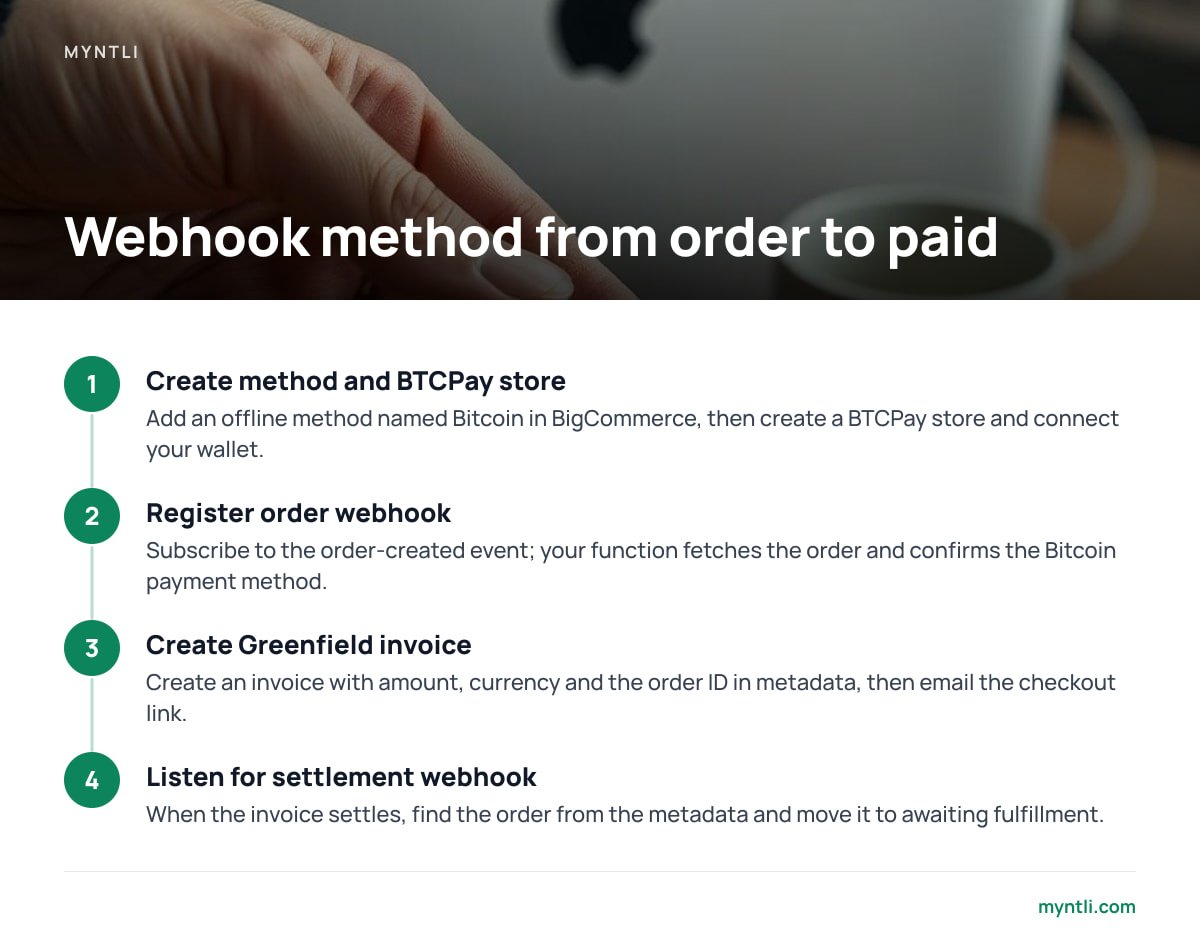
1. Create the offline method and the BTCPay store
In BigCommerce, add an offline payment method named "Bitcoin" with instructions telling the buyer a payment link will arrive by email. In BTCPay, create a store and connect your wallet. Use a wallet whose seed phrase only you hold. If you have no wallet yet, set one up first, since every later step assumes it exists.
2. Register a BigCommerce order webhook
Subscribe to the order-created event. When it fires, your function fetches the order through the BigCommerce API, confirms the payment method is your Bitcoin one, and reads the total and currency.
3. Create the invoice through the Greenfield API
BTCPay's Greenfield API lets you create an invoice with an amount, a currency and metadata. Put the BigCommerce order ID in the metadata so you can match payment to order later. The response includes a checkout link, which you email to the customer.
4. Listen for the settlement webhook
Configure a BTCPay webhook pointing at your function. When an invoice settles, look up the order ID from the metadata and use the BigCommerce API to move the order from awaiting payment to awaiting fulfillment.
BTCPay signs every webhook with an HMAC-SHA256 hash in the BTCPay-Sig header. If your handler skips that check, anyone who discovers the URL can mark orders as paid.
Pro Tip: Store the BTCPay invoice ID on the BigCommerce order (a staff note or order metafield works) at the moment you create it. When a customer emails "I paid, where's my order?", you can find the invoice in seconds, and your settlement handler can ignore duplicate events by checking whether that order is already marked paid. BTCPay can deliver a webhook more than once, so an idempotent handler is not optional.
What Happens When a Customer Underpays, Overpays or Walks Away
Bitcoin invoices have edge cases that card checkouts hide. BTCPay's default invoice window is 15 minutes, adjustable in store settings. Past that, the exchange rate locked into the invoice lapses and the invoice expires. The Greenfield API reports the outcome in the invoice status (New, Processing, Settled, Expired or Invalid) and an additional status such as PaidPartial, PaidOver or PaidLate.
Decide your rules before launch:
- Expired and unpaid. Cancel the BigCommerce order after a set period, such as 24 hours, and restock the items.
- Paid partial. Do not ship. Email the customer a new invoice for the remainder, or refund the partial amount to an address they supply.
- Paid over. Ship, then refund the difference or credit it, whichever your policy says. Write the policy on your checkout page.
- Paid late. If the rate moved against you, you can honor the order or ask for a top-up. State which in your terms.
Refunds are manual. The buyer cannot reverse a bitcoin payment, and BTCPay supports refund links you can send, but the customer must provide a receiving address. Plan for that conversation.
Fees, Custody and Compliance: What You Take On

With a self-hosted BTCPay store, no processor takes a percentage and no third party holds your funds. Your costs are the network fee the buyer pays to send the transaction, plus hosting and your time maintaining the glue code. A custodial processor handles disputes, conversion and support, and in return you give up custody and pay a percentage. Self-custody puts all of that on you.
On regulation, FATF's guidance on virtual assets is written around virtual asset service providers, meaning businesses that exchange, transfer or safekeep assets for other people. A processor that holds your funds fits that description. A store that receives payment into its own wallet for goods it sells generally does not, though your jurisdiction's rules govern, so confirm locally. Tax is separate: each sale is a taxable event with a fair market value on the day, which is why we wrote a year-end walkthrough for reporting bitcoin sales.
Which Method I'd Pick, and When I'd Change My Mind
Start with webhook automation. It removes the manual step, needs perhaps a few hundred lines of code, and runs on a cheap function host. Manual invoices are fine for a two-week test of whether your customers want to pay in bitcoin at all. Build a custom checkout redirect only when you already have a developer maintaining a custom storefront, because otherwise you are paying for polish on an unproven payment method.
Other shop platforms have ready-made plugins, such as the WooCommerce setup or the Magento 2 plugin route, and the setup there is mostly configuration. BigCommerce asks for code. If nobody on your team can maintain a webhook handler, factor in that cost, or consider a general-purpose payment module approach on a platform that supports it.
Get a BTCPay Server Backend for Your BigCommerce Store Without Running Servers
The hard part of this integration is the BTCPay half: a node that stays synced, updated and reachable, so your webhooks never hit a dead endpoint. Myntli installs and monitors that for $29 a month on our node, or sets up a full BTCPay Server on your own server for $449. Customers pay into your wallet, we take no percentage and never hold funds, and we walk you through wallet setup if you do not have a self-custody wallet yet. API access is included for custom integrations, which is what a BigCommerce connection is.
Our ready-made shop integrations cover WooCommerce, Shopify, Ghost, Magento, PrestaShop, Drupal Commerce, Invoice Ninja and ReplaPay. BigCommerce is not on that list. We host the BTCPay side and give you the API keys, but you or your developer write the webhook code between BigCommerce and BTCPay. Check the current spec sheet before you commit.
Frequently Asked Questions
Does BigCommerce support Bitcoin payments natively?
No. BigCommerce has no built-in bitcoin gateway, so you connect one through an offline payment method with webhooks, or through a custom checkout built on its developer tools. The payment processing itself happens in a separate system such as BTCPay Server.
Is there an official BTCPay Server plugin for BigCommerce?
BTCPay's plugin list covers platforms such as WooCommerce and Magento, but BigCommerce is not among them. You integrate through the Greenfield API instead. Check BTCPay's documentation and the BigCommerce app marketplace for any newer listing before you build.
How do I know a customer has actually paid?
BTCPay sends a webhook when an invoice reaches the settled status. Your handler should verify the BTCPay-Sig signature, match the invoice to the BigCommerce order through the metadata you stored, and then update the order status through the BigCommerce API.
What happens if the invoice expires before the customer pays?
BTCPay's default invoice window is 15 minutes, and you can change it in store settings. After expiry the locked exchange rate lapses, so you should cancel the order after a set time or send a fresh invoice. A payment that arrives after expiry shows up as paid late, and your policy decides whether to honor it.
Do I pay fees to accept bitcoin through BTCPay?
BTCPay Server charges no percentage on payments. The customer pays the network fee when sending the transaction, and you pay for hosting and for maintaining your integration code.
Sources
- BTCPay Server Documentation | BTCPay Server
- BTCPay Server Greenfield API v1 | BTCPay Server
- BigCommerce Developer Center | BigCommerce
- FATF Virtual Assets | Financial Action Task Force